
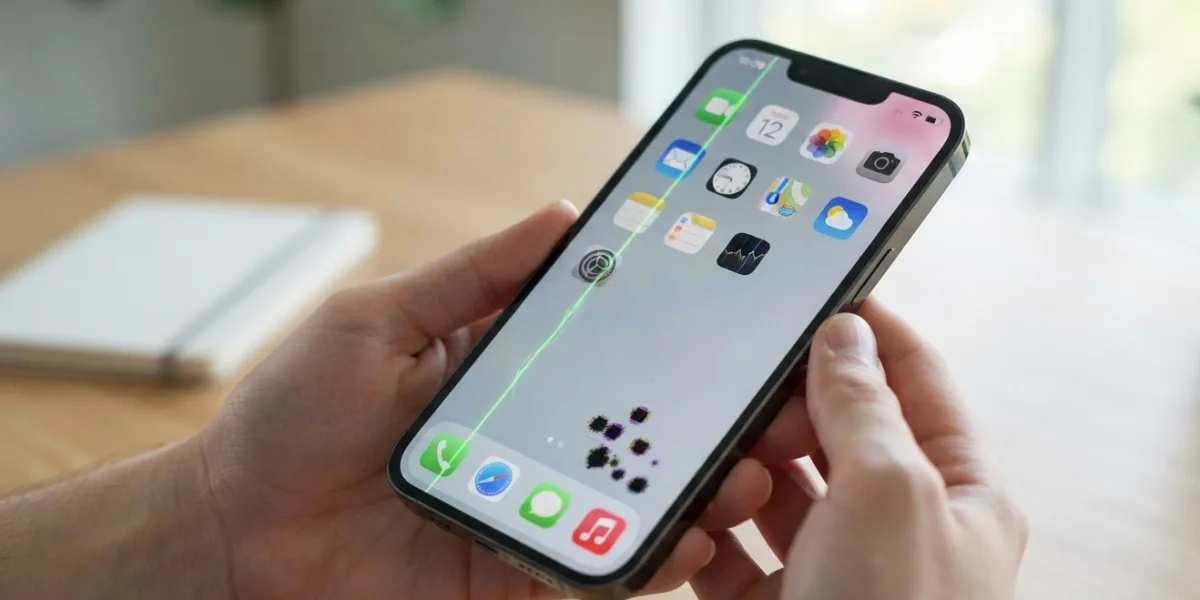
Seeing unexpected lines, dark spots, bright spots, or strange colors on your iPhone screen can be alarming. A display that was previously clear may suddenly develop a vertical line, a black spot, a green tint, flickering areas, or uneven colors. Sometimes the cause is minor, while in other cases it can indicate physical damage to the display.
For anyone looking for Avenue D Cellular, dependable cell phone repair brooklyn ny, or professional iphone repair brooklyn, understanding the possible causes can help you decide whether the issue can be resolved with simple troubleshooting or requires professional screen repair.
Table of Contents
-
Why Are Lines, Spots, or Discoloration Appearing?
-
Common Causes of iPhone Screen Lines and Spots
-
What Different Screen Problems May Mean
-
How to Troubleshoot iPhone Screen Discoloration
-
When Does an iPhone Screen Need Repair?
-
How to Prevent Further Screen Damage
-
Frequently Asked Questions
-
Conclusion and CTA
Why Are Lines, Spots, or Discoloration Appearing?
Your iPhone display contains millions of pixels and tiny components that work together to produce images and colors. If individual pixels or parts of the display panel stop functioning correctly, you may see bright or dark spots, lines, unusual colors, or other visual abnormalities.
Apple notes that display panels can occasionally develop pixel anomalies where individual pixels or subpixels remain dark or bright. Foreign material trapped within a display can also appear as an irregular spot.
However, screen abnormalities are not always caused by defective pixels. Drops, pressure, liquid exposure, overheating, damaged display connections, software issues, or a previous screen replacement can also contribute.
Common Causes of iPhone Screen Lines and Spots
1. Physical Damage From a Drop
One of the most common reasons for lines or spots appearing on an iPhone screen is physical impact.
A phone can suffer internal display damage even when the outer glass does not appear severely cracked. A drop can affect the display panel, internal connectors, or other components beneath the glass.
You may notice:
-
Vertical or horizontal lines
-
Black or dark spots
-
Flickering sections
-
Colored lines
-
Areas with unusual brightness
-
Touch problems
If the problem appeared immediately after dropping your iPhone, hardware damage is a strong possibility.
2. Pressure on the Display
Excessive pressure can damage the delicate layers inside a display.
Keeping an iPhone in a tightly packed pocket, sitting on it, placing heavy objects on it, or pressing forcefully against the screen can potentially contribute to display damage.
Sometimes the damage appears gradually rather than immediately.
3. Dead or Stuck Pixels
A small dot that remains permanently black, white, red, green, or another color may be related to a pixel or subpixel problem.
Apple explains that pixel anomalies can occur when a transistor associated with a subpixel does not operate correctly, leaving that portion of the display dark or bright.
A single tiny pixel issue may remain localized, while larger or spreading areas can indicate a broader display problem.
4. Liquid or Moisture Exposure
Liquid can cause serious problems inside an iPhone.
Even if your phone continues working after exposure to water, moisture can affect display connections and other internal components. Screen discoloration, flickering, lines, or touch problems may appear afterward.
If the display problem started after liquid exposure, avoid assuming that it will resolve on its own.
5. Damaged Display Connector
The screen connects to the iPhone's internal hardware through delicate connections. A drop or previous repair can potentially affect these connections.
A damaged or improperly seated connection can result in:
-
Intermittent lines
-
Flickering
-
Missing portions of the image
-
Random discoloration
-
Touch problems
-
A screen that works only at certain angles
This type of problem generally requires professional inspection.
6. Software or iOS Issues
Not every display problem is caused by physical damage.
A temporary software issue can sometimes cause abnormal colors, flickering, or other unusual display behavior. If the problem appeared suddenly without a drop, liquid exposure, or other physical event, software should be considered.
Restarting the iPhone and keeping iOS updated can be useful troubleshooting steps. Apple also recommends restarting the device and checking the screen for water or debris when troubleshooting screen-related problems.
7. Previous Screen Replacement
If your iPhone has previously had its display replaced, the quality and compatibility of the replacement display can affect how the screen performs.
Apple notes that nongenuine displays can potentially cause issues involving Multi-Touch, brightness, color calibration, True Tone, ambient-light sensing, and uniformity.
If the lines or discoloration appeared after a recent screen replacement, the repair history is an important clue.
8. Overheating
Excessive heat can affect iPhone performance and display behavior.
Using the device in direct sunlight, leaving it in a hot vehicle, charging while performing demanding tasks, or running intensive applications for extended periods can cause the device to become hot.
Apple notes that when an iPhone becomes too hot, the screen can dim as the device attempts to regulate its temperature.
If discoloration or lines appear only when the phone is extremely warm and disappear after it cools, temperature may be contributing to the problem.
What Different Screen Problems May Mean
Not all display abnormalities look the same. The appearance of the problem can provide useful clues.
Vertical Lines
Vertical lines may indicate damage to the display panel or its internal connections. If a line appeared after a drop or pressure, hardware damage is particularly likely.
Horizontal Lines
Horizontal lines can also be associated with display-panel damage, connection problems, or other internal faults.
Black Spots
A small black spot could be an individual pixel issue, trapped material, or localized display damage.
If a black spot grows over time, professional inspection is recommended.
Green, Purple, or Pink Lines
Colored lines are often associated with display hardware problems, although software-related causes should not be completely ruled out.
If a colored line remains visible across different apps and screens, it is more likely to be related to the display rather than a particular application.
Yellow or Blue Tint
An overall yellow, blue, or warm appearance may sometimes be related to display settings such as True Tone, Night Shift, or accessibility color filters.
Apple provides display settings that can change color appearance, including True Tone, Night Shift, and Color Filters.
If the entire screen changes color rather than showing a specific damaged area, check your display settings before assuming the screen is physically damaged.
How to Troubleshoot iPhone Screen Discoloration
Before arranging a repair, try these basic steps.
1. Restart Your iPhone
Restart the device and check whether the lines or discoloration disappear.
If the issue was caused by a temporary software problem, a restart may resolve it.
2. Clean the Screen
Dirt, moisture, or residue can sometimes make the display appear abnormal.
Turn off the iPhone and gently clean the screen using a soft, lint-free cloth. Avoid getting moisture into openings and avoid abrasive cleaners. Apple recommends a soft, slightly damp, lint-free cloth for cleaning the iPhone.
3. Remove the Screen Protector
A damaged, poorly fitted, or low-quality screen protector can sometimes affect the appearance or touch response of the display.
Remove it temporarily and check the screen again.
4. Disconnect Accessories
Disconnect charging cables and other accessories and test the display.
Apple recommends disconnecting Lightning or USB-C accessories when troubleshooting certain screen problems.
5. Check Display Settings
If the entire display looks unusually warm, cool, dark, or tinted, check:
Settings > Display & Brightness
Review:
-
True Tone
-
Night Shift
-
Brightness
-
Dark Mode
You can also check:
Settings > Accessibility > Display & Text Size
Look for:
-
Color Filters
-
Color Inversion
-
Reduce White Point
If changing these settings does not affect the abnormal area, a hardware problem becomes more likely.
6. Check Whether the Problem Appears Everywhere
Open different apps, the Home Screen, Settings, and other parts of the iPhone.
If the same line or spot appears everywhere, it is less likely to be caused by one particular app.
You can also take a screenshot and view it on another device. If the abnormality does not appear in the screenshot when viewed elsewhere, that can be a useful clue that the physical display itself is responsible.
When Does an iPhone Screen Need Repair?
Professional inspection may be appropriate if the problem continues after basic troubleshooting.
You should consider getting the device checked if:
-
Lines remain permanently on the screen.
-
Black spots are getting larger.
-
Colored lines appear repeatedly.
-
The screen flickers.
-
Touch stops working in certain areas.
-
The display becomes unusually bright or dark.
-
The issue began after a drop.
-
The iPhone was exposed to liquid.
-
The problem started after a screen replacement.
-
The display problem continues after restarting the phone.
Apple provides display diagnostics on supported newer devices that can help identify pixel anomalies and other display-panel issues.
A professional technician can also inspect the display and internal connections to determine whether the screen itself needs replacement or whether another component is responsible.
Should You Replace the Screen Immediately?
Not necessarily.
A line or spot does not automatically mean that a complete screen replacement is the only solution. The underlying cause should be identified first.
For example, a software setting may cause unusual color appearance, while physical display damage may require a replacement. A damaged connector may require a different repair.
Proper diagnosis helps prevent unnecessary parts replacement.
For people searching for cell phone repair brooklyn ny, having the iPhone inspected before authorizing a repair can help determine the appropriate solution.
If you need iphone repair brooklyn, a professional technician can evaluate the display, connections, and other components to identify the cause of the problem.
How to Prevent Further Screen Damage
Although display problems cannot always be prevented, good handling habits can reduce the risk.
Use a Protective Case
A quality case can provide additional protection against drops and impacts.
Avoid Excessive Pressure
Do not place heavy objects on your iPhone or keep it somewhere where it can be bent or crushed.
Keep the Device Away From Liquids
Even water-resistant devices should not be treated as completely waterproof. Avoid unnecessary exposure to water and moisture.
Avoid Extreme Temperatures
Keep your iPhone away from excessive heat and dramatic temperature changes. Extreme conditions can affect the device and its battery.
Use Quality Repair Parts
If your display needs replacement, use a reputable repair provider and appropriate parts. Apple notes that display quality and compatibility can affect brightness, color, touch performance, and other functions.
Frequently Asked Questions
1. Why are lines appearing on my iPhone screen?
Lines can be caused by physical display damage, pressure, damaged internal connections, liquid exposure, previous repairs, or occasionally software problems.
2. Why does my iPhone have a black spot on the screen?
A black spot can be related to a damaged area of the display or a pixel anomaly. If the spot grows or is accompanied by lines and touch problems, professional inspection is recommended.
3. Can an iPhone screen repair fix colored lines?
If the colored lines are caused by physical display damage, replacing the damaged display may resolve the issue. However, the device should be diagnosed first to determine the actual cause.
4. Can software cause screen discoloration?
Yes. Display settings, accessibility color filters, Night Shift, True Tone, or temporary software problems can change the appearance of the screen. Persistent localized lines or spots are more suggestive of a hardware issue.
5. Can dropping an iPhone cause screen spots?
Yes. A drop can damage the internal layers of the display even when the outer glass looks relatively normal.
6. Can water damage cause lines on an iPhone screen?
Yes. Liquid can affect display components and internal connections, potentially causing lines, discoloration, flickering, or touch problems.
7. Should I keep using my iPhone if the screen has lines?
If the phone is otherwise functioning normally, you may be able to use it temporarily, but persistent or worsening display problems should be inspected. If the device is unusually hot, swollen, or has suffered liquid damage, stop using it and seek professional assistance.
8. Is every screen spot a dead pixel?
No. Spots can have several causes, including pixel anomalies, trapped material, physical display damage, or other internal issues. Apple notes that foreign material can sometimes resemble a pixel anomaly.
Conclusion
Lines, spots, and discoloration on an iPhone screen can have several causes. A small pixel anomaly or display setting may be relatively simple, while lines that appear after a drop, liquid exposure, or previous repair can indicate a more significant hardware problem.
Start with basic troubleshooting such as restarting the iPhone, cleaning the screen, checking display settings, removing the screen protector, and disconnecting accessories. If the problem remains or becomes worse, professional diagnosis is the safest way to determine whether the display, connector, or another component is responsible.
Whether you are searching for Avenue D Cellular, dependable cell phone repair brooklyn ny, or professional iphone repair brooklyn, getting your device properly inspected can help you avoid unnecessary repairs and find the right solution for your screen problem.
CTA: Need Help With Your iPhone Screen?
Don't ignore persistent lines, spots, flickering, or unusual discoloration. If basic troubleshooting does not solve the problem, have your iPhone professionally inspected.
A proper diagnosis can determine whether the issue is caused by the display, software, settings, or an internal component—and help you get your iPhone screen back to clear, reliable performance.


