
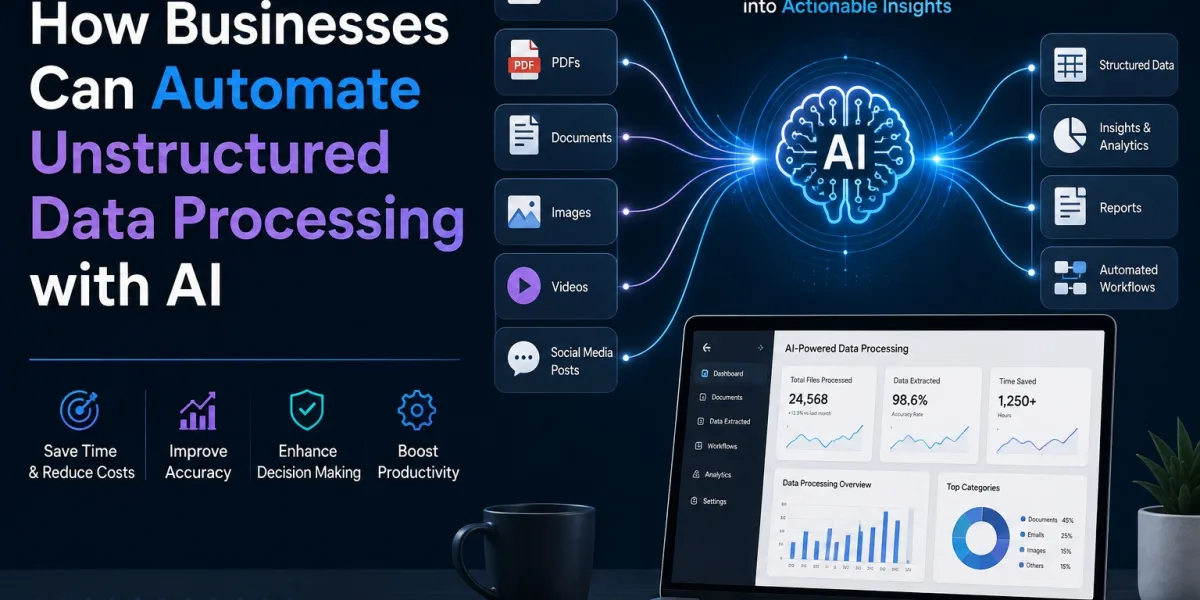
Businesses generate enormous amounts of data every day. While some of this information is stored in structured formats such as spreadsheets and databases, a significant portion exists as unstructured data. Emails, PDFs, contracts, invoices, customer reviews, social media posts, images, audio files, videos, and scanned documents are all examples of unstructured information.
Traditionally, processing this data has required employees to manually read, classify, extract, and organize information. This approach is time-consuming, expensive, and prone to human error. As data volumes continue to increase, businesses need smarter ways to manage and analyze unstructured information.
This is where AI-powered unstructured data processing can make a significant difference.
Artificial intelligence technologies such as Natural Language Processing (NLP), Machine Learning (ML), Optical Character Recognition (OCR), Computer Vision, Generative AI, and Large Language Models (LLMs) enable businesses to transform unstructured information into useful, actionable data.
In this guide, we will explore what unstructured data processing is, why it is challenging, how AI can automate it, common business use cases, benefits, implementation steps, challenges, and best practices.
What Is Unstructured Data?
Unstructured data refers to information that does not follow a predefined format or organized structure that can be easily stored and analyzed using traditional databases.
Examples include:
- Emails
- PDF documents
- Contracts
- Invoices
- Customer feedback
- Social media posts
- Chat conversations
- Images
- Scanned documents
- Audio recordings
- Video files
- Legal documents
- Medical records
- Product reviews
For example, a customer might send an email explaining a problem in their own words. Unlike a structured form with predefined fields, the email contains information in a free-text format.
Businesses need to understand this information before they can take action.
AI can help automate this process by reading, interpreting, classifying, and extracting important information from unstructured sources.
Why Is Unstructured Data Difficult to Process?
Unstructured data creates several challenges for businesses.
1. Lack of Standardization
Different documents may contain different formats, layouts, terminology, and structures.
2. Large Data Volumes
Businesses may receive thousands of emails, documents, and customer messages every day.
3. Manual Processing
Employees often need to manually review documents and extract relevant information.
4. Context Understanding
Simply extracting text is not enough. Businesses often need to understand the meaning and context behind the information.
5. Data Silos
Unstructured information may be distributed across email systems, cloud storage, CRM platforms, internal databases, and communication tools.
6. Human Errors
Manual data extraction and classification can result in inaccurate or incomplete information.
These challenges make traditional data processing methods inefficient for large-scale unstructured information.
AI can automate the entire data processing lifecycle, from data collection and extraction to classification, analysis, and action.
A typical AI-powered workflow may look like:
Data Collection → Document Processing → Text or Image Extraction → Classification → Information Extraction → AI Analysis → Validation → Business Action
Let's explore each stage.
1. Collecting Unstructured Data
The first step is collecting information from different sources.
AI-powered systems can process data from:
- Emails
- PDFs
- Websites
- CRM platforms
- ERP systems
- Cloud storage
- Chat applications
- Customer support platforms
- Scanned documents
- Social media
- Audio and video sources
Instead of manually gathering information from multiple platforms, automated workflows can collect data and send it to a centralized processing system.
2. Extracting Information with OCR
Many businesses still rely on scanned documents and images.
Optical Character Recognition (OCR) technology allows AI systems to convert text from images and scanned documents into machine-readable formats.
For example, an AI-powered document processing system can extract information from:
- Scanned invoices
- Receipts
- Application forms
- Identity documents
- Contracts
- Insurance documents
Modern AI-powered OCR solutions can go beyond simple text recognition by understanding document layouts and identifying specific fields.
3. Using NLP to Understand Text
Natural Language Processing helps AI systems understand human language.
NLP can be used to analyze:
- Emails
- Customer messages
- Reviews
- Contracts
- Support tickets
- Survey responses
- Social media comments
For example, an AI system can analyze thousands of customer reviews and identify whether customers are primarily discussing pricing, product quality, customer service, or delivery issues.
This enables businesses to extract insights without manually reading every message.
4. Classifying Documents Automatically
AI can automatically classify unstructured documents based on their content.
For example, an AI system can categorize incoming documents as:
- Invoice
- Contract
- Purchase order
- Resume
- Complaint
- Insurance claim
- Legal document
- Customer request
Once the document is classified, the system can automatically route it to the appropriate workflow.
For example:
Invoice → Finance Workflow
Resume → Recruitment Workflow
Customer Complaint → Support Workflow
This reduces manual sorting and improves operational efficiency.
5. Extracting Key Information
AI can identify important information from unstructured documents and convert it into structured data.
For example, an AI system processing an invoice might extract:
- Vendor name
- Invoice number
- Invoice date
- Due date
- Product details
- Quantity
- Tax
- Total amount
The extracted data can then be automatically sent to an accounting or ERP system.
This process helps businesses convert unstructured information into structured, actionable data.
6. Using Generative AI and Large Language Models
Generative AI and Large Language Models can help businesses understand complex documents and text.
They can perform tasks such as:
- Summarization
- Question answering
- Content classification
- Information extraction
- Document comparison
- Sentiment analysis
- Data interpretation
For example, an AI system can analyze a 50-page contract and generate a summary highlighting:
- Key obligations
- Payment terms
- Renewal conditions
- Termination clauses
- Important deadlines
Employees can then review the AI-generated insights instead of manually searching through the entire document.
7. Connecting AI with Business Workflows
The real value of AI-powered unstructured data processing comes when extracted information automatically triggers business actions.
For example:
Customer Email → AI Reads Message → Identifies Complaint → Extracts Customer ID → Checks CRM → Creates Support Ticket → Assigns Priority → Notifies Support Team
This creates an intelligent workflow where AI does not simply analyze data but helps businesses act on it.
1. Invoice and Document Processing
Businesses receive thousands of invoices and financial documents.
AI can automatically:
- Read invoices
- Extract financial information
- Match purchase orders
- Detect duplicate invoices
- Identify discrepancies
- Route documents for approval
This can significantly reduce manual accounting work.
2. Customer Service Automation
AI can process customer emails, chat messages, and support tickets.
It can identify:
- Customer intent
- Sentiment
- Urgency
- Product issues
- Frequently asked questions
The system can then automatically categorize and route customer requests.
3. Contract Analysis
Legal and procurement teams often spend significant time reviewing contracts.
AI can analyze contracts to identify:
- Important clauses
- Obligations
- Risks
- Renewal dates
- Payment terms
- Compliance requirements
This helps legal and business teams review large document volumes more efficiently.
4. Healthcare Data Processing
Healthcare organizations manage large volumes of unstructured information, including:
- Clinical notes
- Medical reports
- Patient documents
- Diagnostic reports
- Insurance documents
AI can help organize and summarize information while supporting healthcare professionals in accessing relevant data more efficiently.
Because healthcare data is highly sensitive, strong security, privacy, and regulatory controls are essential.
5. Insurance Claims Processing
Insurance companies can use AI to process claims documents, images, and customer communications.
AI can help:
- Extract claim information
- Analyze documents
- Review supporting evidence
- Identify missing information
- Detect potential fraud indicators
- Route claims for further review
This can help reduce processing times and improve operational efficiency.
6. Human Resources and Recruitment
Recruitment teams receive large volumes of resumes and applications.
AI can analyze resumes and extract:
- Skills
- Experience
- Education
- Certifications
- Job history
It can then classify candidates based on predefined criteria and help recruiters prioritize applications.
Human review should remain part of the process, especially for important hiring decisions.
7. Customer Feedback Analysis
Businesses receive feedback from multiple channels.
AI can analyze:
- Online reviews
- Survey responses
- Social media comments
- Support conversations
- Product feedback
It can identify common themes and sentiment trends, helping companies understand customer needs and improve their products and services.
Faster Data Processing
AI can process large volumes of documents and text much faster than manual teams.
Reduced Operational Costs
Automating repetitive data processing can reduce the time employees spend on administrative activities.
Improved Accuracy
AI-powered extraction and validation can reduce errors associated with manual data entry.
Better Business Insights
AI can uncover patterns and trends hidden within large volumes of unstructured information.
Improved Employee Productivity
Employees can focus on higher-value activities instead of manually reviewing documents and messages.
Faster Decision-Making
Businesses can access relevant information more quickly, enabling faster decisions.
Scalability
AI-powered systems can process increasing volumes of data without requiring proportional increases in workforce capacity.
Step 1: Identify Your Data Sources
Start by identifying where unstructured data exists within your organization.
Consider:
- Emails
- Documents
- Customer conversations
- Contracts
- Images
- Audio
- Video
Create an inventory of data sources and identify which ones have the highest business value.
Step 2: Define the Business Problem
Avoid implementing AI simply because the technology is available.
Instead, identify a specific problem.
For example:
- Invoice processing takes too long.
- Customer emails are difficult to categorize.
- Employees spend hours reviewing contracts.
- Customer feedback is not analyzed effectively.
A clearly defined problem makes it easier to select the right AI solution.
Step 3: Choose the Right AI Technologies
Different types of unstructured data require different technologies.
For example:
| Data Type | Potential AI Technology |
|---|---|
| Text | NLP and LLMs |
| Scanned documents | OCR |
| Images | Computer Vision |
| Audio | Speech Recognition |
| Video | Video Analysis |
| Complex documents | Generative AI and LLMs |
Many enterprise solutions combine multiple technologies.
Step 4: Build an AI Processing Pipeline
Create a pipeline that defines how data moves through the system.
A typical workflow might be:
Data Collection → Preprocessing → AI Analysis → Information Extraction → Validation → Data Storage → Business Action
The pipeline should be designed around business requirements and security standards.
Step 5: Integrate with Existing Systems
AI processing becomes more valuable when it connects to existing business applications.
Integrations may include:
- CRM
- ERP
- Accounting software
- Document management systems
- Cloud storage
- Customer support platforms
APIs and secure integration frameworks can help connect these systems.
Step 6: Add Human Validation
AI should not always operate without supervision.
Human review can be introduced when:
- AI confidence is low
- Data is incomplete
- The decision has financial impact
- Legal or compliance risks are involved
- Sensitive information is processed
This approach provides a balance between automation and human expertise.
Step 7: Monitor and Improve the System
AI processing systems should be continuously monitored.
Businesses should track:
- Extraction accuracy
- Processing time
- Error rates
- Human intervention
- Cost per document
- Workflow completion rates
Regular monitoring helps organizations improve AI performance over time.
Implementing AI-powered unstructured data processing can require expertise in AI, data engineering, software integration, automation, and cloud technologies.
An ai automation agency in USA can help businesses identify suitable automation opportunities and design intelligent workflows that process unstructured data at scale.
Depending on business requirements, an AI automation partner may help with:
- AI workflow design
- Intelligent document processing
- AI agent development
- NLP implementation
- OCR integration
- Generative AI solutions
- Business system integration
- Workflow automation
- Data processing pipelines
- AI monitoring and optimization
Businesses can start with a single use case and gradually expand AI automation across different departments.
Organizations with complex requirements may need custom AI solutions instead of standard automation tools.
An ai development company in usa can help businesses develop customized solutions for:
- Large-scale document processing
- Enterprise AI platforms
- Custom NLP applications
- AI-powered search
- RAG-based knowledge systems
- Intelligent document analysis
- AI agents
- Machine learning solutions
Custom AI development can be particularly valuable when businesses need to process industry-specific data or integrate AI deeply into existing enterprise systems.
Businesses looking for broader software engineering expertise may also work with a Software Development Company in Dallas to build and integrate AI-powered data processing solutions.
A software development partner can help create:
- Custom enterprise applications
- API integrations
- Data processing platforms
- Cloud-based AI systems
- Workflow management solutions
- Business dashboards
- AI-enabled SaaS products
Combining software development with AI automation allows businesses to create complete solutions rather than relying on disconnected tools.
Despite its benefits, businesses should consider several challenges.
Data Quality
Poor-quality data can affect AI accuracy.
Security and Privacy
Sensitive business and customer information must be protected.
Integration Complexity
Connecting AI systems with legacy applications can be technically challenging.
AI Accuracy
AI models may occasionally produce incorrect results and should be validated for critical processes.
Regulatory Compliance
Industries such as healthcare, finance, and insurance may have strict data and compliance requirements.
Implementation Costs
Developing and maintaining AI systems requires investment in technology, infrastructure, and expertise.
Businesses should follow these best practices:
Start with a High-Value Use Case
Begin with a process where automation can produce measurable results.
Maintain Data Security
Use encryption, access controls, authentication, and secure data storage.
Combine AI with Traditional Automation
Use AI for interpretation and traditional automation for predictable tasks.
Keep Humans Involved
Use human validation for sensitive or high-risk decisions.
Monitor AI Performance
Track accuracy and identify potential errors.
Build Scalable Architecture
Design systems that can handle growing data volumes.
Continuously Improve
Use feedback and performance data to improve the AI system.
The amount of unstructured data generated by businesses will continue to grow. At the same time, AI technologies are becoming increasingly capable of understanding text, images, audio, video, and complex documents.
Future AI systems will likely combine:
- Generative AI
- Large Language Models
- AI agents
- Computer vision
- Natural Language Processing
- Speech recognition
- Intelligent document processing
- Workflow automation
This will allow businesses to build intelligent data pipelines that can understand information, make decisions, and initiate actions automatically.
Instead of simply storing unstructured data, organizations will increasingly transform it into actionable intelligence.
For example:
Unstructured Data → AI Understanding → Structured Insights → Intelligent Decision → Automated Action
This shift can help businesses improve operational efficiency and create more responsive, data-driven organizations.
Unstructured data contains valuable business information, but extracting that value manually is difficult, expensive, and time-consuming. AI technologies provide businesses with new ways to process, understand, classify, and act on information stored in documents, emails, customer conversations, images, audio, and other unstructured formats.
By combining AI with workflow automation, businesses can automate document processing, improve customer service, accelerate decision-making, and uncover valuable insights hidden within large volumes of data.
Organizations can begin by identifying a specific high-value use case, selecting the appropriate AI technologies, integrating the solution with existing systems, and gradually expanding automation.
Whether a business works with an ai automation agency in USA, an ai development company in usa, or a Software Development Company in Dallas, the key is to build a secure, scalable, and business-focused AI solution.
As AI technology continues to evolve, organizations that learn to effectively process and utilize unstructured data will be better positioned to improve productivity, reduce operational costs, and gain a competitive advantage in the digital economy.
Frequently Asked Questions
What is unstructured data processing?
Unstructured data processing is the process of extracting, organizing, analyzing, and understanding information that does not follow a predefined data format, such as emails, PDFs, images, audio, videos, and customer feedback.
How can AI automate unstructured data processing?
AI can use technologies such as NLP, OCR, computer vision, machine learning, and generative AI to extract information, classify documents, understand content, identify patterns, and trigger automated business workflows.
What are examples of unstructured data?
Common examples include emails, contracts, invoices, PDFs, customer reviews, social media posts, chat messages, scanned documents, images, audio recordings, and videos.
What are the benefits of AI-powered unstructured data processing?
The key benefits include faster processing, reduced manual work, lower operational costs, improved accuracy, better insights, increased productivity, and improved scalability.
Can AI process documents automatically?
Yes. AI-powered document processing systems can extract text, identify document types, capture important fields, summarize content, detect anomalies, and send information to other business systems.
Is AI-based unstructured data processing secure?
It can be secure when businesses implement appropriate access controls, encryption, data governance, privacy policies, and monitoring. Organizations should also select AI solutions that meet their specific regulatory and security requirements.


